All Work

ThaiTongue

UX Case Study

Learning Thai is challenging, not just because of vocabulary, but because of tones, cultural nuance, and lack of contextual learning in most apps. ThaiTongue was designed to make learning feel more natural and engaging by combining structured guidance with real-world cultural understanding.

5/5 participants improved tone awareness after guided pronunciation practice

Faster lesson completion with a more intuitive, mobile-first learning flow

Stronger learner confidence through culturally grounded and contextual learning experience

E-Learning Intuitive Learning AI + Human Hybrid Culturally Grounded Experience

Most language learning apps focus on vocabulary and repetition, but Thai learners often struggle with tones, pronunciation, and cultural context.

Which are essential to real communication and often under-supported in existing tools. Few engaging platforms bring all of these needs together in one place, so learners are left switching between apps for lessons, feedback, and real interaction. This makes it harder for learners to stay consistent and build confidence over time.

Early research showed that

  1. Learners found tones to be one of the biggest barriers to speaking confidently

  2. Existing tools offered limited support for pronunciation feedback and cultural context

  3. The learning experience often felt disconnected, with no clear hybrid model combining self-paced learning and human interaction

  4. Users wanted something more interactive and motivating than passive lesson-based platforms

  5. The gap between learning in an app and using Thai in real life made it harder to build confidence

Small-group Thai learning session — instructor at whiteboard teaching tones to seated participants outdoors

Ran small-group learning sessions to observe pronunciation challenges, interaction patterns, and how learners respond to different types of feedback.

"I never know if I'm saying it right. The app just moves me forward even when I'm wrong."

To make learning Thai more effective and engaging, I focused on creating a system that adapts to each learner while supporting both independent practice and real interaction.

Personalized learning paths

Customizable topics and skill levels make the content more relevant to each learner, helping them stay engaged and progress at their own pace.

AI feedback with human support

Real-time AI feedback helps learners improve tone and pronunciation, with the option to book 1:1 sessions for deeper guidance and confidence.

Peer learning through shared practice

Lab sessions connect learners at a similar level to practice conversation together in a low-pressure environment.

Culturally grounded learning

Cultural context is integrated into lessons to help learners understand not just what to say, but how and when to use it in real situations.


Personalized Learning Paths

To make learning feel more relevant and easier to stick with, I designed a system that lets learners shape both what they learn and how they practice.

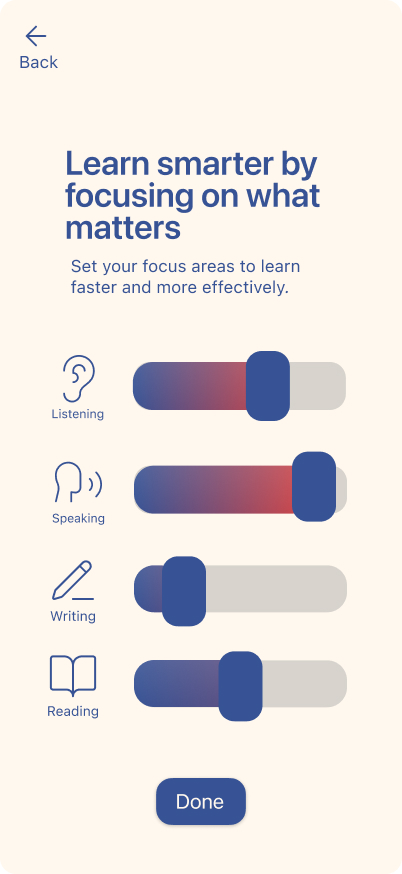
Customizable Skill Focus

Skill focus screen letting learners adjust slider emphasis on listening, speaking, writing, and reading

Learners can put more focus on the skills they want to improve most, such as listening, speaking, reading, or writing. This helps the experience feel more aligned with their goals and practice needs.

Topic-Based Personalization

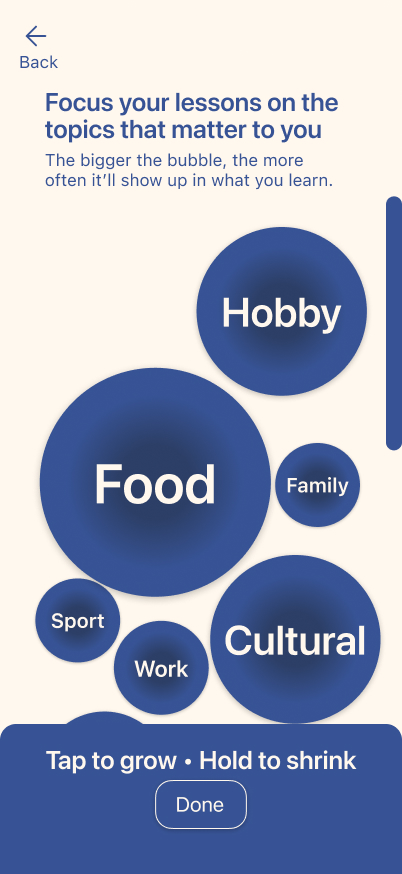
Topic bubble screen letting learners prioritize subjects like food, work, hobby, or cultural topics

Learners can also choose topics that matter to them, like food, work, or culture. Making lessons feel more personally relevant helps keep practice engaging and easier to stay consistent with.

A Learning Journey That Feels Ongoing

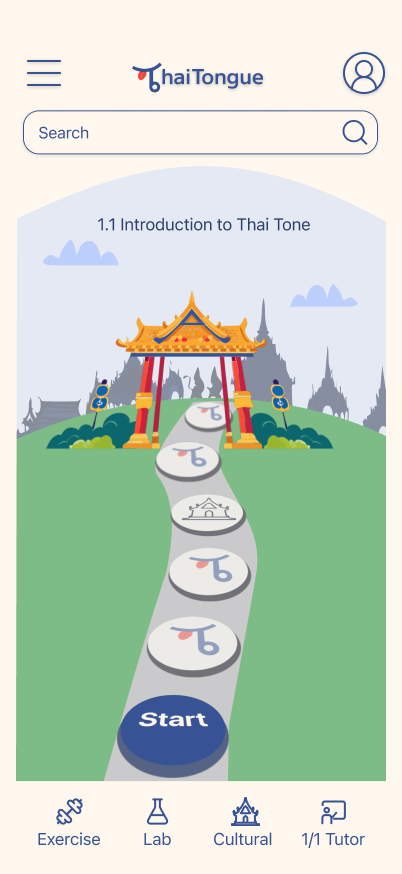
To make learning feel more engaging and easier to return to, I designed the home screen as a perspective path that turns lessons into a visible journey rather than a static list. The screen also acts as a window into Thailand, using changing surroundings to connect the learning experience to culture and topic in a more immersive way.

Thai Tongue home screen showing a perspective path journey through a Thai landscape with lesson stones
  1. Journey-based progression — Lessons are placed along a forward path to make progress feel more visible and encourage learners to keep going over time

  2. Cultural context through the interface — The screen frames learning as a window into Thailand, helping culture become part of the experience instead of something separate from it

  3. Topic-driven visual change — The environment around the journey can shift with the lesson topic, making content feel more relevant, dynamic, and connected to what learners are studying

  4. Hybrid learning always accessible — Exercise, Lab, Cultural, and 1:1 Tutor are placed in the main navigation so learners can easily move between self-paced study, cultural learning, peer conversation, and individual support

Guided Pronunciation Practice

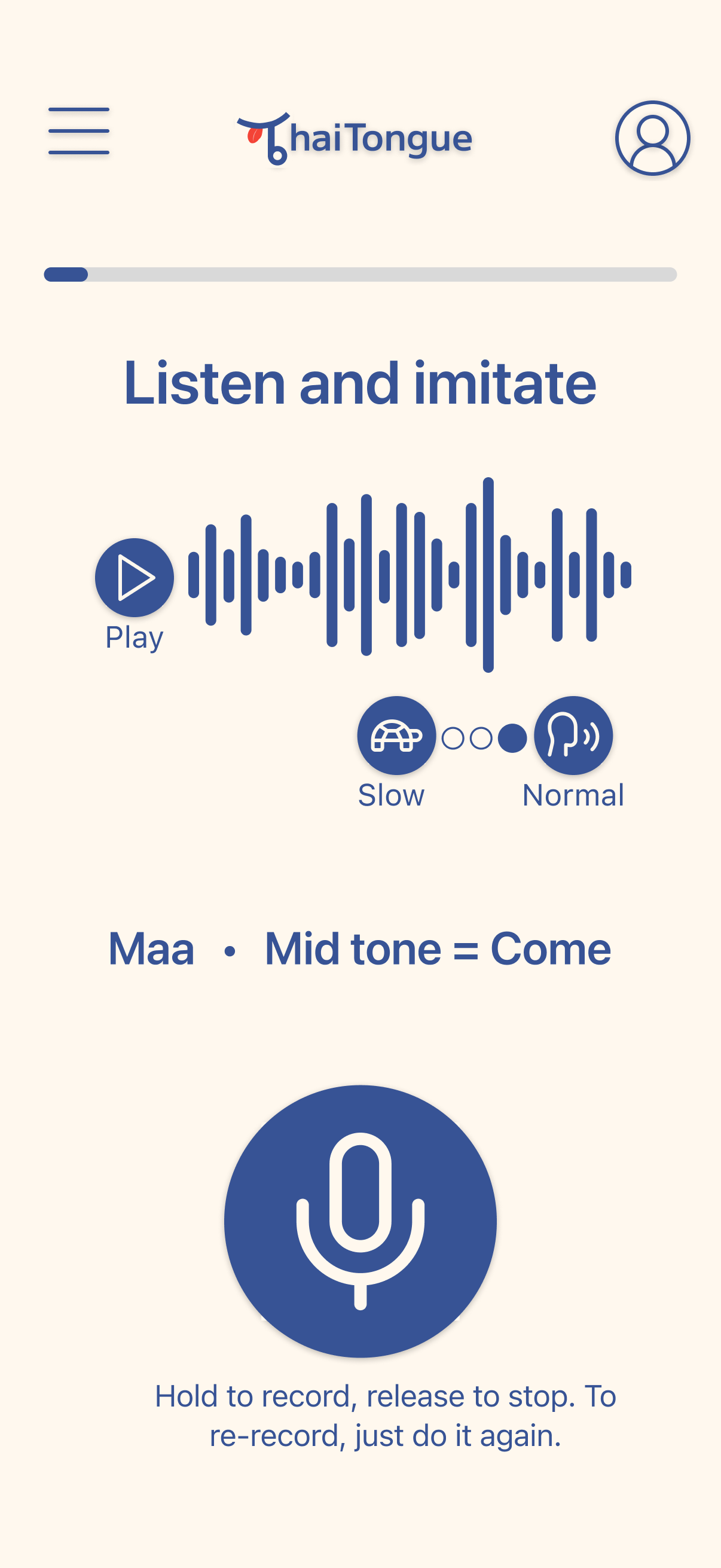
This screen helps learners practice pronunciation in a way that feels clear and easy to follow, so they can focus on listening, repeating, and improving without overthinking.

Guided pronunciation screen showing waveform, slow/normal speed toggle, and hold-to-record microphone button
  1. Speed control — Learners can slow the audio down to hear tone differences more clearly and practice at their own pace

  2. Simple first-time guidance — A popup explains how recording works for new users and appears again if someone stays inactive, so they do not get stuck

  3. Built for repetition — The flow makes it easy to listen, imitate, and try again, helping learners build confidence through practice

AI Feedback That Guides Improvement

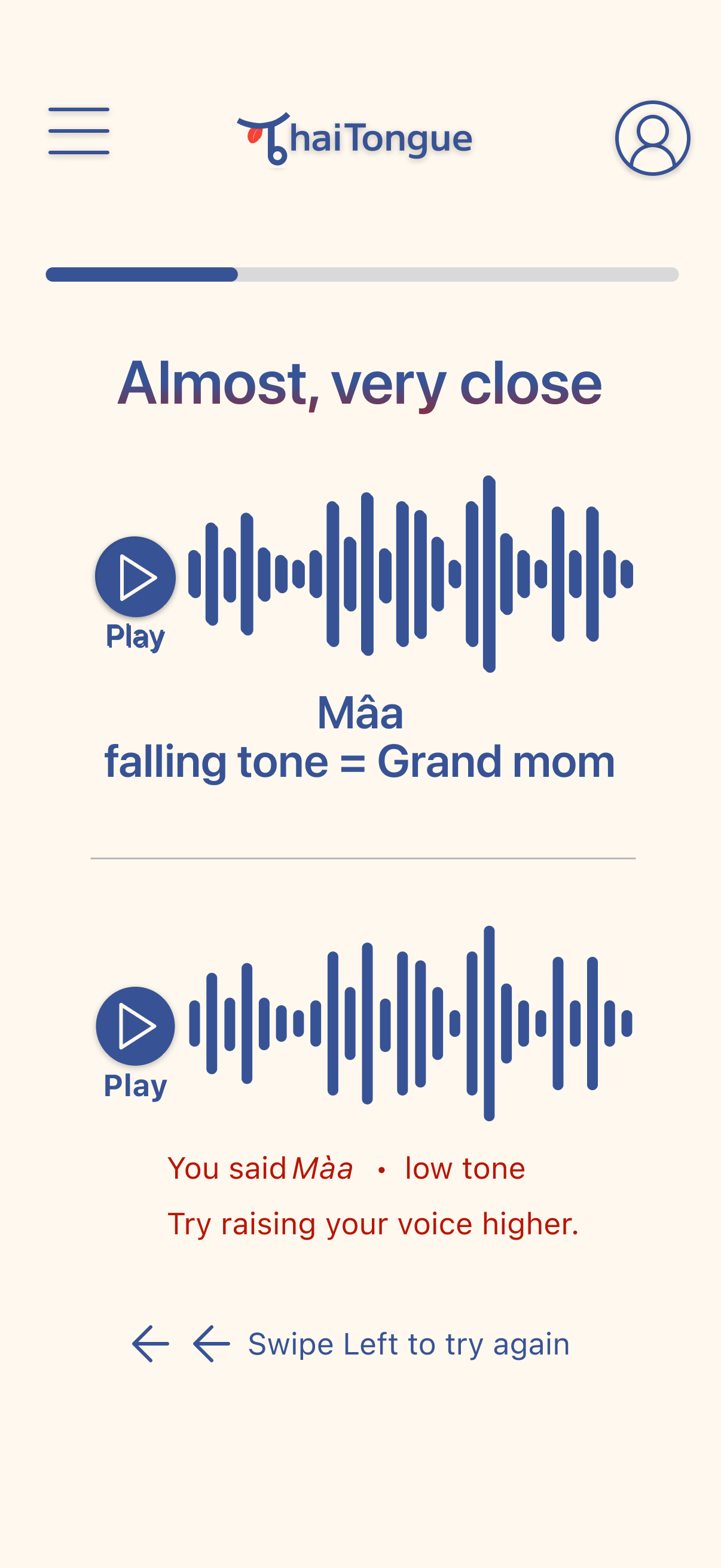
To support more confident self-paced practice, I designed AI feedback to be specific enough to help learners improve on their own, while still leaving room for human support when needed.

AI feedback screen showing learner said wrong tone with specific correction and suggestion to try again
  1. More detailed than right or wrong — The feedback shows what tone the learner used and how it differs from the correct one

  2. Clear next step — Instead of vague correction, it tells learners what to adjust so they know what to try next

  3. Side-by-side comparison — Helps learners hear the difference between their attempt and the correct pronunciation

  4. Supports the hybrid model — AI handles immediate pronunciation feedback during practice, while 1:1 tutor support is available when learners need deeper guidance


After 2 rounds of user testing, I found that learners responded well to more guided tone practice, clearer pronunciation support, and a more interactive learning experience.

The testing also showed interest in learning that goes beyond self-paced practice alone.

5/5

Participants said tone practice felt clearer with guided feedback and comparison

5/5

Participants responded positively to a more interactive learning experience

Learners showed strong interest in culturally grounded content and additional support beyond independent practice

This project reinforced that while AI can make practice more accessible and give quick feedback, learning still benefits from human support. Language is not just about getting the right answer. It also involves confidence, nuance, and connection. That insight helped shape the direction of the concept, even though not every part of that support system was fully designed yet.

← Previous case study

FlyKind

Aligning marketing and manufacturing in a unique eco business model

View FlyKind

Back to portfolio

All Work

Browse all case studies

View All Work →